Product
Introducing Trace UI: shipment tracking components you can own
Build a React shipment timeline with your own tracking provider. Try the local visual builder, split-order examples and Next.js starter with durable signed webhooks.
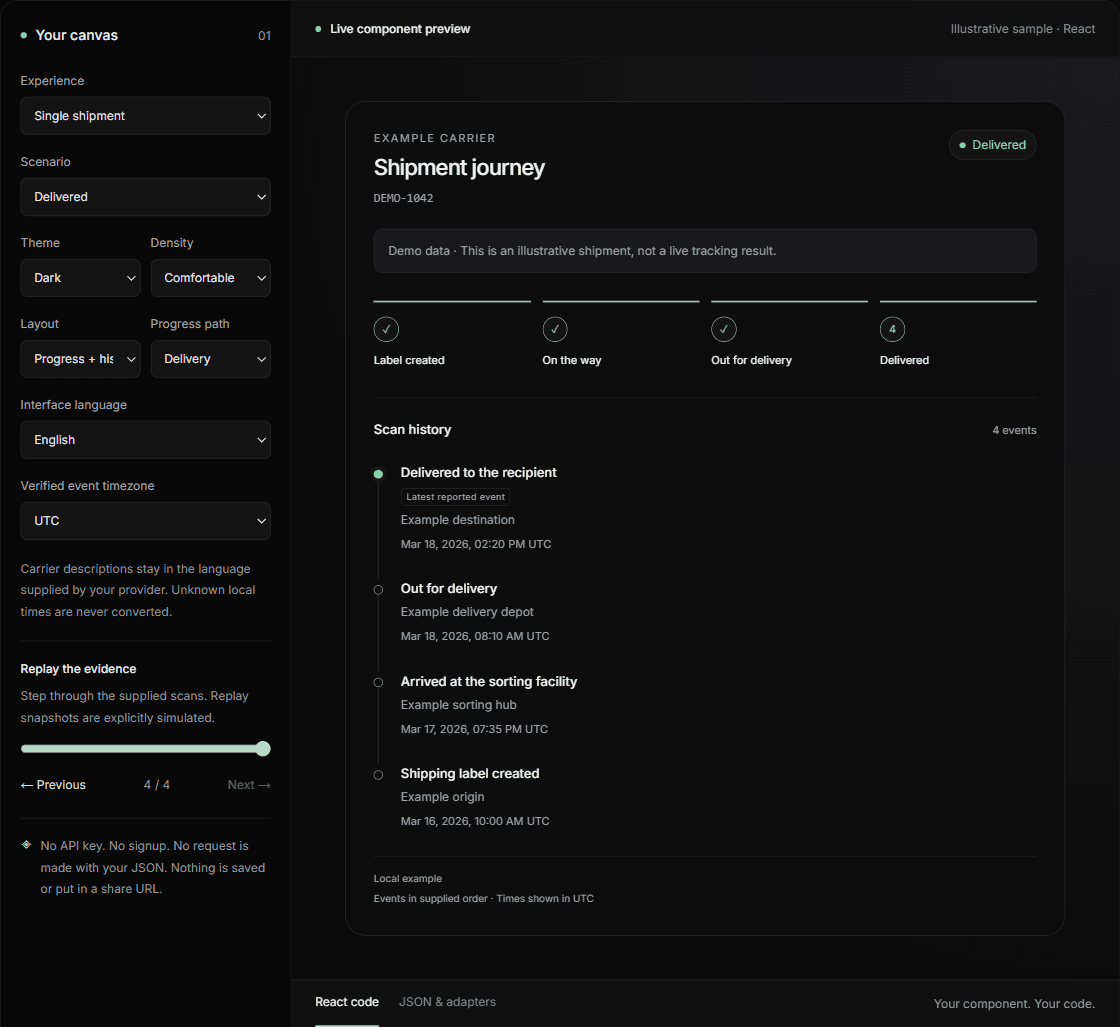
A tracking page should answer three questions: what happened, what happens next, and how current is this information? Making those answers clear becomes harder when an order has several parcels, a carrier omits a timezone, or the latest lookup fails.
Today we are introducing Trace UI 0.2.0: MIT-licensed React components for shipment tracking, a visual builder, and a Next.js starter. Bring your own provider and your own design. You can try the components with local sample data before creating an account, adding an API key or connecting a database.
Start with a timeline you can actually try
Open the builder, choose a shipment scenario, and switch between light and dark themes, comfortable and compact spacing, or a full timeline and history-focused layout. The preview uses the real components. Export the React code when the presentation fits your application.
The local JSON playground accepts the component model or a Trace-shaped response and reports validation errors before rendering. Pasted data stays in page memory: it is not uploaded, saved or placed in a share URL. Use fictional or sanitized examples when preparing screenshots or copying code into a public issue.
Get a local example running
With Node.js 22 or later, clone the public repository and start the demo. The root demo needs no signup, key or database. It lets you explore supplied shipment states before choosing a backend. The five-minute integration goal applies to this first local render; deploying customer authentication, a database and live tracking requires additional setup.
git clone https://github.com/traceapi-dev/trace-ui.git
cd trace-ui
npm ci
npm run dev

# Open http://localhost:3000Use the components with your own tracking data
Trace UI supports React 18.2 and React 19, uses plain CSS, and renders on the server. It requires neither Tailwind nor Trace branding. The library makes no network requests and includes no tracking telemetry. Map your provider's response into TimelineShipment rather than coupling your interface to that provider's payload.
Install the pinned package with npm install https://traceapi.dev/downloads/traceapi-timeline-0.2.0.tgz. Registry publication is still pending, so the direct download is the supported installation path today. In Next.js, import the stylesheet in your root layout. The fictional example below deliberately retains an unknown timezone.
import { ShipmentTimeline, type TimelineShipment } from "@traceapi/timeline";
import "@traceapi/timeline/styles.css";

const shipment: TimelineShipment = {
  reference: "DEMO-1042",
  carrier: "Example carrier",
  status: "in_transit",
  freshness: "simulated",
  events: [{
    description: "Arrived at the sorting facility",
    timestamp: null,
    localTime: "2026-03-17T19:35:00",
    timezone: "unknown",
  }],
};

export default function TrackingView() {
  return <ShipmentTimeline shipment={shipment} theme="light" />;
}Make uncertainty part of the interface
A recent response is not necessarily a recent carrier scan. Trace UI separates shipment events from the supplied freshness state and last check time. Stale data is last-known information. An unavailable lookup is not evidence that a parcel is pending, lost or delayed. Your backend supplies that evidence and its freshness policy; the component presents it.
When a source supplies a local time without a verifiable offset, the timeline keeps that local value and labels the missing timezone. It does not guess UTC or move the scan into the viewer's timezone. Events keep their supplied order, and a latest scan is highlighted only when explicit ordering or comparable verified timestamps support it. No delivery percentage or ETA is invented.
Build the experience your customer needs
Use ShipmentTimeline for a complete view, or compose summary, progress, scan history, freshness and exception primitives. A support panel may need only the latest known state and history. A customer order page can use OrderTracking to keep several parcels together while retaining each parcel's carrier, status and freshness.
Supplied scenarios include exceptions, customs, pickup, returns, cancellations, carrier handoffs and split orders. Configurable progress stages let those journeys follow their own path. A return does not silently complete the normal delivery path. The read-only return template displays supplied evidence; it does not create a return authorization, label or refund.
Interface dictionaries cover English, Spanish, French and Arabic, including right-to-left layout. Override labels to fit your product. Carrier descriptions remain the text you supply rather than being automatically translated.
Test the awkward states before going live
The builder's scenario replay lets you inspect supplied events and simulated snapshots: one parcel delivered while another travels, a stale observation, no verified scan, or an unavailable source. These fixtures test your presentation, not a carrier's reliability. Add your own sanitized fixtures for the carriers, languages and unusual histories your application encounters.
Check the mobile layout, keyboard navigation, long descriptions and timezone disclosures in your application. Trace UI provides semantic sections, ordered scan lists and textual states, but your surrounding layout and controls still need their own accessibility review.
Persist webhook updates before acknowledging them
A beautiful page also needs a dependable update path. The optional Next.js order example verifies the original signed webhook bytes and saves an inbox entry in Postgres before acknowledging receipt. A separate worker updates a saved, revision-ordered projection. Duplicate delivery does not apply the same event twice, and an older revision does not overwrite a newer one.
Local commands exercise duplicates, out-of-order arrival and recovery after a worker stops. This complete fictional workflow needs your own Postgres database. For a merchant deployment, connect your customer identity system, enforce order ownership on the server, and define retention and abuse controls. The starter is an implementation example, not a replacement for those responsibilities.
Connect Trace when you want a tracking backend
Trace is an optional backend for the components. Keep its API key on your server and use the sandbox to exercise simulated delivery, exception and unknown-timezone responses without making live carrier requests or using monthly lookup quota. Sandbox requests still require authentication and follow per-minute limits.
For real shipments, review supported carrier coverage, plan allowances and failure behavior before integration. Successful live, cached and explicitly allowed stale lookups use your allowance. Monitoring is best effort, not a refresh guarantee. The UI release does not enable experimental tracking sources or change your billing. You can also keep your existing backend and use Trace UI independently.
Make the next shipment easier to understand
Start with one realistic journey. Make its scan history readable, its freshness visible and its next action clear. Then test the exceptions and split orders that your customers actually see. That is the experience Trace UI is designed to help you build.
Try the builder, take the source, and tell us which scenario or integration needs work. When reporting an issue, include a minimal sanitized example rather than a customer tracking number or private payload. The most useful feedback is a concrete journey the interface should explain more clearly.